COMPARE · DXVK VS WINED3D · LAB DATA, NO REAL GPU YET
DXVK vs WineD3D: which renderer should your game use?
How we checked this
What each one is
| What it is | A Direct3D 8 to 11 to Vulkan translation layer | Wine’s own Direct3D implementation |
|---|---|---|
| Output | Vulkan | OpenGL (a Vulkan backend is described as experimental; untested here) |
| Where it ships | Proton, most launchers, or copied in by hand | Inside Wine, used when DXVK is absent |
| Licence | zlib | LGPL, as part of Wine (not re-verified here) |
| Maintained by | Philip Rebohle and contributors; Valve keeps a tree for Proton | The Wine project |
No rows match.
Descriptions of WineD3D come from general knowledge and the Wine project; we did not re-verify them against its source.
How to tell which one your game is using
Under Wine, DXVK files next to the game are ignored unless a DLL override says native. Without the override our test program silently used Wine’s built-in system32\d3d11.dll, which is WineD3D, and it reported a made-up adapter, “NVIDIA GeForce GTX 470” (F03). With the override DXVK was active and its version banner and HUD appeared (F03, F15).

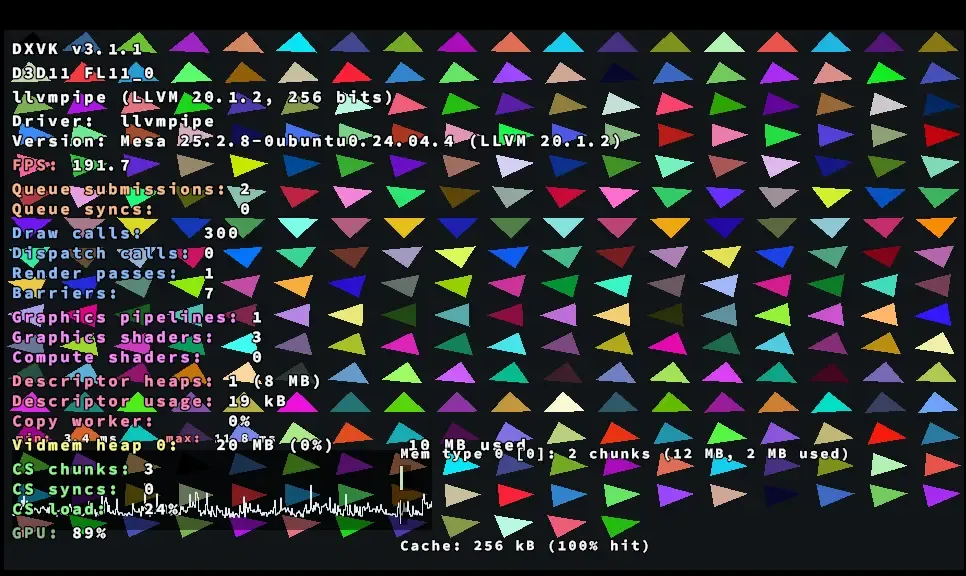
So a missing HUD means DXVK is not loaded. In Proton, PROTON_USE_WINED3D=1 forces WineD3D; see the Proton page.
What we measured
In our lab: a CPU-rendered test app
Both renderers drew a small test program on a software GPU. We varied how many draw calls it made per frame. These are relative numbers for a CPU-rendered test app, not game performance.
Lab only: this shows how we measure, not how games run. A CPU renderer sits at the other end, so it says nothing about real GPUs.
Show the data
| Item | Value (FPS) |
|---|---|
| 100 draws: WineD3D | 340.8 |
| 100 draws: DXVK 3.1.1 | 211.1 |
| 1,000 draws: WineD3D | 261.6 |
| 1,000 draws: DXVK 3.1.1 | 162.2 |
| 4,000 draws: WineD3D | 137.1 |
| 4,000 draws: DXVK 3.1.1 | 94.3 |
Lab only: same method, same caveat. Not a game result.
Show the data
| Item | Value (FPS) |
|---|---|
| 100 draws: WineD3D | 351.6 |
| 100 draws: DXVK 3.1.1 | 330.7 |
| 1,000 draws: WineD3D | 225.9 |
| 1,000 draws: DXVK 3.1.1 | 234.3 |
| 4,000 draws: WineD3D | 94.5 |
| 4,000 draws: DXVK 3.1.1 | 121.7 |
Do not read these as “DXVK is slower” or “faster”. Both layers had a CPU renderer at the other end, which removes the thing that matters in games: a real GPU and its drivers. Method and raw files are on How we test.
In our test app, device creation took 45 to 79 ms with DXVK and 117 to 195 ms with WineD3D (F37). That is also CPU-rendered and relative only.
On real GPUs
Not done. The plan (T-CMP-01) is four to six Direct3D 9 and 11 games on AMD and NVIDIA GPUs under Linux, DXVK 3.1.1 against WineD3D, with average FPS, 1% lows and a note on visible glitches. Until it exists this page makes no real-GPU claim. For what is reported about DXVK’s effect on frame rate see Does DXVK increase FPS?
When WineD3D is the better choice
- Your GPU has no suitable Vulkan driver. DXVK 3.x needs a Vulkan 1.4-class driver, 2.x needs 1.3. For an older GPU try DXVK 1.10.3 or Sarek first; if there is no Vulkan at all, WineD3D is what remains.
- A game renders wrongly with DXVK. Try another DXVK version first. If it stays wrong, WineD3D is the fallback; see error messages for how to read the log.
- A virtual machine without Vulkan. WineD3D needs only OpenGL.
How to switch: in Proton use PROTON_USE_WINED3D=1; in plain Wine remove the DLL overrides and the DXVK files from the prefix (DXVK on Linux); in Lutris, Bottles or Heroic, change the runner’s DXVK setting (launchers).
“WineD3D for Windows”
People search for a Windows version of WineD3D. A community build of Wine’s Direct3D DLLs exists, aimed at very old GPUs and virtual machines. It is the same idea as DXVK on Windows with a different target: OpenGL rather than Vulkan. We did not test it and cannot name a verified download page here. Rule of thumb: only take it from its maintainer’s own page, and never from sites that offer single DLL files (“wined3d.dll download”), because you cannot tell what is inside them. See Is DXVK safe? for the same rule applied to DXVK.
Which should you use?
- Linux or Steam Deck, current GPU driver: DXVK. Proton already does this for you.
- A game broken under DXVK: try another DXVK version, then WineD3D.
- An old GPU without Vulkan 1.3: DXVK 1.10.3 or Sarek, then WineD3D.
- Windows: you rarely need either; native Direct3D is the normal path. See all the layers.
Questions people ask
What does WineD3D do?
It is Wine's built-in Direct3D. When a Windows game under Wine asks for Direct3D and DXVK is not installed, WineD3D answers and translates the calls to OpenGL.
Is DXVK better than WineD3D?
On a GPU with a current Vulkan driver DXVK is the usual first choice, and it is what Proton uses. We cannot give measured proof on real GPUs yet: our numbers come from a CPU-rendered test app and say nothing about games.
How do I switch from DXVK to WineD3D?
In Proton add PROTON_USE_WINED3D=1 %command% to the launch options. In plain Wine remove the DLL overrides and the DXVK files from the prefix. Check with the DXVK HUD: if it does not appear, DXVK is not running.
Why does my game look wrong with DXVK but fine with WineD3D?
Some games hit DXVK rendering bugs. Try another DXVK version, read the built-in profile for the game, and if it stays wrong use WineD3D and consider reporting it.
Can I use WineD3D on Windows?
A community build exists for very old GPUs and virtual machines. We have not tested it. Take it only from its maintainer's own page, never from DLL-download sites.
Does WineD3D have a Vulkan backend now?
Our research notes describe an experimental one. We did not test it and publish no result for it.
Sources
- DXVK README at v3.1.1 · accessed 2026-11-07
- Wine project · accessed 2026-11-07
- Wine source (WineD3D) · accessed 2026-11-07