GUIDE · SHOW FPS · CHECK DXVK IS ON · DXVK 3.1.1
The DXVK HUD: turn it on, read it, and fix it when it does not appear
How we checked this
Turn on the HUD
Two ways, with the same values. Pick by platform. A HUD that appears is the quickest proof that DXVK is running: our lab apps drawn by Wine’s own Direct3D or by Windows’ native Direct3D showed no HUD (F18).
On Windows: dxvk.conf
- Create a text file named
dxvk.confin the folder that holds the game’s.exe(see the dxvk.conf guide; Windows may hide the extension, so make sure it is notdxvk.conf.txt). - Put one line in it:
dxvk.hud = fps,version(ordxvk.hud = 1). - Start the game. Look in the top-left corner.
DXVK reads the DXVK_HUD environment variable first and uses the dxvk.hud line only when the variable is empty. That is how the 3.1.1 source reads; we tested the variable, not the conf line, on Windows.
On Linux, Steam Deck, Lutris, Bottles: DXVK_HUD
Set the environment variable before the game starts. In Steam, use the launch option DXVK_HUD=1 %command%. Steam’s own performance overlay is a separate thing. Our Linux and Windows lab captures used the variable (F18).
HUD playground
Pick items, a scale and an opacity. The strings update as you go; copy the one for your platform. The syntax follows DXVK’s own parser in the 3.1.1 source (we tested the strings against a port of that parser, not by pasting them into a real game run).
Environment variable (Linux, Steam launch options)
DXVK_HUD=version,api,devinfo
dxvk.conf line (Windows)
dxvk.hud = version,api,devinfo
Preview (illustrative values, not measurements)
DXVK draws its own colours, spacing and numbers. Compare with the real captures below.
What every HUD line means
This table follows the 3.1.1 code, not the README. The README still lists samplers (removed in 2.7) and leaves out latency.
| Value | What it shows | API | When it helps | Seen by us |
|---|---|---|---|---|
| 1 | Shortcut for devinfo plus fps. | All | The default quick check. | Yes (F18) |
| full | Every item at once. | All | Reading everything once, or reporting a problem. | Yes (F18) |
| version | The line "DXVK v3.1.1". | All | Proof of which DXVK is loaded. | Yes |
| api | The Direct3D version and feature level, for example D3D11 FL11_0. | D3D9, D3D11 | Checking which API the game uses. | Yes |
| devinfo | GPU name, driver name and driver version. | All | Checking DXVK picked the right GPU (laptops). | Yes |
| fps | Frames per second. | All | Quick performance check. | Yes |
| frametimes | A graph of recent frame times, with min and max. | All | Spotting stutter that an FPS number hides. | Yes |
| submissions | Queue submissions and queue syncs. | All | Developer-level detail. | Yes (in full) |
| drawcalls | Draw calls, dispatch calls, render passes and barriers. | All | Comparing how heavy a scene is. | Yes (in full) |
| pipelines | Graphics pipelines, graphics shaders and compute shaders. | All | Seeing pipelines being created. | Yes (in full) |
| descriptors | Descriptor pools and sets, or heaps and usage on newer drivers, plus a copy worker load. | All | Developer-level detail. | Yes (in full) |
| memory | Memory heaps: video and system memory used. | All | VRAM checks. | Yes (in full) |
| allocations | Memory allocation chunks by memory type. | All | Developer-level detail. | Yes (in full) |
| cs | Command-stream thread: chunks, syncs and load. | All | CPU-side bottleneck hints. | Yes (in full) |
| gpuload | GPU load percentage (an estimate that may be inaccurate). | All | Is the GPU the limit? | Yes |
| compiler | Shader compiler activity, only while shaders compile. | All | Stutter hunting. See the stutter page. | Nothing drawn in our capture |
| latency | Latency information (DXVK 2.6 and newer). | D3D9, DXGI | Latency tuning. | No |
| swvp | Software vertex processing. | D3D9 only | D3D9 compatibility debugging. | No |
| scale= | Size, from 0.25 to 4. | All | Readable HUD on a big screen. | Yes (2.0, F18) |
| opacity= | Transparency, from 0.1 to 1. | All | See the game through the HUD. | No |
No rows match.
“Seen by us” means we have it in a lab screenshot (software GPU), so it shows the layout, not typical numbers. Items marked “in full” appeared when we used full; we did not capture each alone.
Reading the HUD: a real example
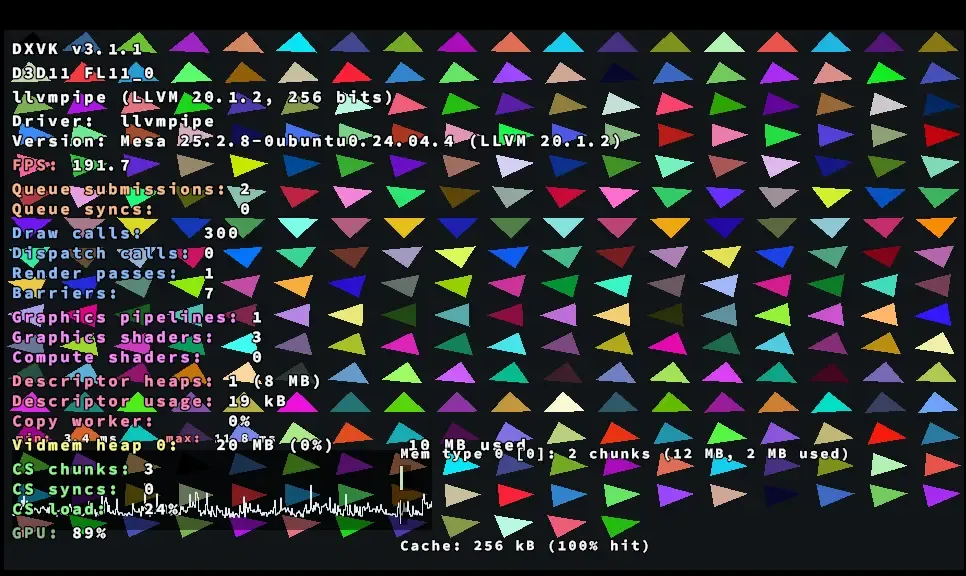
This is DXVK_HUD=full from a Direct3D 11 test program under Wine. The GPU is a software renderer, so the numbers are not what a real GPU shows (F18).
- DXVK v3.1.1: the version of DXVK that is drawing this.
- D3D11 FL11_0: the Direct3D version and feature level the app asked for.
- Device name: the GPU DXVK is using, followed by the driver lines.
- FPS: frames per second.
- Draw calls: how many draws the app submitted per frame.
- Graphics pipelines: pipelines created so far; it rises while shaders compile (see shader stutter).
- Cache: the shader cache line, here “256 kB (100% hit)”. We read it as the cache size and how often DXVK found what it needed; see the stutter page.
- GPU: GPU load. It is an estimate and may be inaccurate.
HUD not showing? Check these in order
No HUD almost always means DXVK is not loaded. Work down the list.
Causes 1 to 5 are backed by our tests as shown; 6 and 7 are expected behaviour we have not reproduced (the real-GPU tests are not possible here), and 8 follows from what DXVK is. Here is the same test app with and without DXVK:

If the log exists but still no HUD, check the log: see the errors page and DXVK not working.
Hide the HUD, change its size, place it elsewhere
- Hide it: remove the
dxvk.hudline, or unsetDXVK_HUD. - Size and see-through: add
scale=andopacity=to the list. In the lab,scale=2.0doubled the HUD (F18). - Position: DXVK has no position option. We read the HUD code at v3.1.1 (
dxvk_hud.cpp) and the only options it reads arescaleandopacity. On Linux, MangoHud lets you place an overlay. - Hotkey: there is no toggle key in the same code. The HUD is on or off for the whole run.
DXVK HUD vs MangoHud vs RTSS
| Tool | Platform | Good for | Watch out for |
|---|---|---|---|
| DXVK HUD | Windows and Linux, any game running DXVK | Proving DXVK is on; DXVK-specific items such as shader compiler activity. | No position or hotkey. Only exists when DXVK is loaded. |
| MangoHud | Linux | Benchmarks and frame-time logging to a file; placeable overlay. | A separate tool to install; behaviour with Wine depends on setup. |
| RTSS and similar | Windows | Overlay for any game. | Overlays can interfere with DXVK in some games. |
No rows match.
We did not test MangoHud or RTSS; the rows describe what each is for. Use the DXVK HUD to check DXVK is on and to watch shader compilation, and a dedicated tool for benchmarking. Benchmarking pages come later in this guide.
Questions people ask
How do I enable the DXVK HUD on Windows?
Create a text file named dxvk.conf next to the game's .exe containing the line dxvk.hud = 1 (or a longer list). DXVK reads the DXVK_HUD environment variable first and falls back to this line when the variable is empty, according to DXVK's source. We confirmed the environment variable in the lab (F18), and read the conf fallback in the source; we did not run the conf line on a Windows desktop.
How do I only show FPS?
Use the item list fps, as DXVK_HUD=fps or dxvk.hud = fps. The value 1 shows the GPU name and FPS (devinfo plus fps).
Why is the HUD not showing?
Usually DXVK is not loaded. Look for a log file next to the .exe: with no log, DXVK is not in use (F13). The list in this page goes through the usual causes in order.
How do I turn the HUD off?
Remove the dxvk.hud line, or unset DXVK_HUD. Setting it to 0 is not documented by DXVK, so remove it instead.
How do I make the HUD bigger?
Add scale to the list, for example DXVK_HUD=fps,scale=2. In the lab, scale=2.0 doubled the HUD (F18). DXVK accepts values from 0.25 to 4.
Does the HUD cost FPS?
Probably a little, more so with full. We have not measured it on a real GPU, so we give no number.
Sources
- DXVK source: src/dxvk/hud/dxvk_hud_item.cpp and dxvk_hud.cpp at v3.1.1 · accessed 2026-11-07
- DXVK README (HUD section) · accessed 2026-11-07
- dxvk.conf at v3.1.1 · accessed 2026-11-07